
A2P Verification — 3 Approval Methods
Every GoHighLevel sub-account sending SMS in the US must complete A2P 10DLC registration. Here are the 3 real-world methods I use to get brands and campaigns approved — with exact steps.
What is A2P 10DLC?
A2P 10DLC (Application-to-Person, 10-Digit Long Code) is the US carrier system for registering business SMS traffic. Every message that leaves GoHighLevel is checked against your registered Brand + Campaign. Get approved and messages deliver instantly; get rejected and your account is throttled or blocked.
Approval requires two things carriers can verify: a visible business identity (website, brand, contact info) and proof of consent (privacy policy, terms, and an opt-in mechanism). The 3 methods below map to different client situations.
What a passing A2P setup actually looks like
Two screenshots from a live client build (Blue Path Realty): the compliant funnel I put together for the A2P Optin, and the final Brand + Campaign approval inside GoHighLevel.
A2P Optin Funnel — 5 required pages
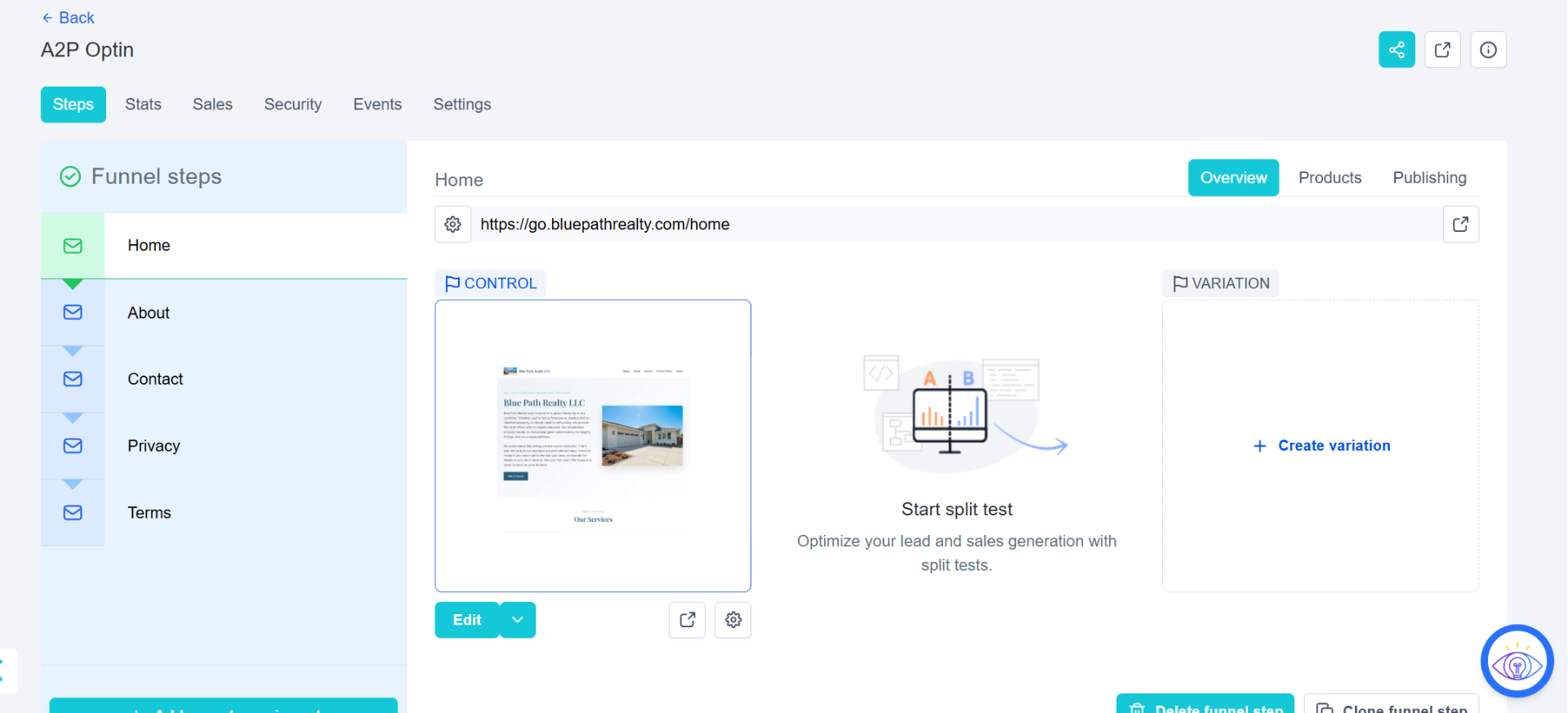
This is the exact funnel I built on the client's subdomain go.bluepathrealty.com. A2P reviewers open the domain and expect to see a real business plus every compliance page — so the funnel has 5 steps, each linked in the footer:
- Home — business name, logo, services, contact info
- About — who the business is (builds trust)
- Contact — form + chat widget with SMS consent line
- Privacy — SMS-specific data & no-share clause
- Terms — SMS terms: STOP, HELP, frequency, rates
Without any of these pages, the campaign is rejected instantly. With all five live on an SSL subdomain, approval is almost always cleared on the first submission.
A2P Messaging — Brand & Campaign Approved
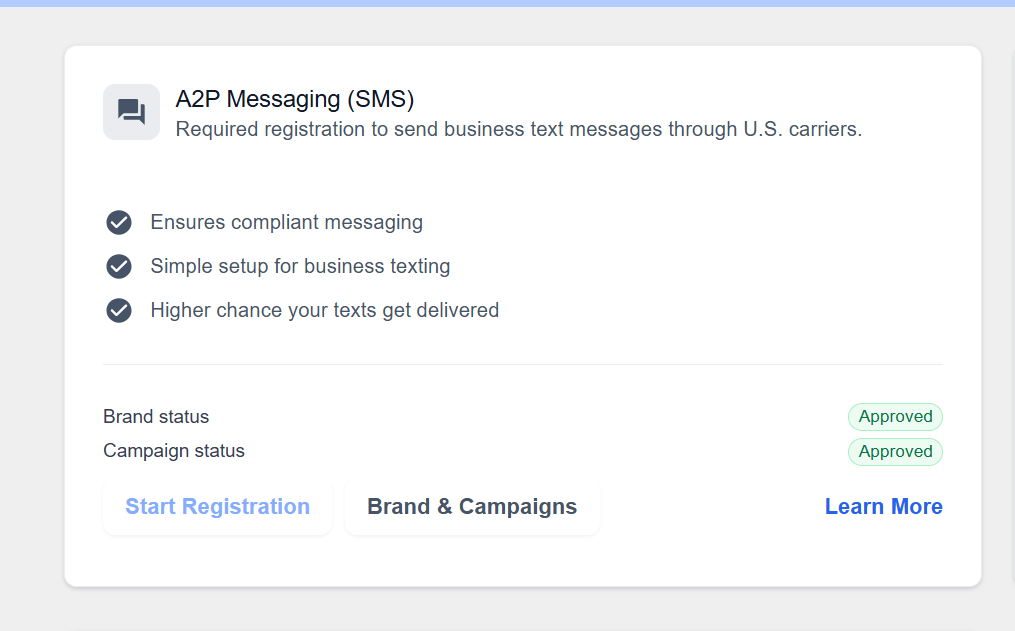
This is the outcome inside GoHighLevel → Phone Numbers → Trust Center after submitting the registration with the funnel above. Both statuses matter:
- Brand status: Approved — the legal business (name + EIN or Sole Prop identity) is verified by The Campaign Registry.
- Campaign status: Approved — the use case, sample messages and opt-in proof are cleared by US carriers.
Only when both are green does GoHighLevel actually deliver SMS through US carriers at full throughput. Anything less (Pending, Failed, one green + one grey) means messages are throttled or blocked — and every A2P setup I ship targets exactly this two-green result.
The 3 methods that actually get approved
Subdomain + Chat Widget
Most common — you build a mini brand-site on a subdomain of your agency domain.
Existing Business Website
Client already has a real website — you just add compliant policy pages and opt-in proof.
Sole Proprietor Registration
No website, low sending volume — register the individual under a light-touch brand.
Subdomain + Chat Widget + Policy Pages
The go-to method — build a compliant brand-site on a subdomain (like go.nextstepre.com or go.bluepathrealty.com).
Why this method works
Carriers need a real, live URL that proves the business exists and describes what SMS it will send. When a client has no website (or an old one), the fastest, cleanest approval path is a purpose-built subdomain of your agency domain, hosted inside GoHighLevel itself.
- 1
Pick a subdomain
Use a short subdomain on your agency domain — go.clientname.com, hi.clientname.com, or app.clientname.com. Keep it professional; carriers reject anything that looks disposable.
- 2
Point DNS to GoHighLevel
In your DNS provider (Cloudflare, GoDaddy, Namecheap), create a CNAME record for the subdomain pointing to funnels.msgsndr.com (or the domain GHL shows in Sites → Domains). Wait for propagation.
- 3
Attach the domain inside GHL
GHL sub-account → Sites → Domains → Add Domain → paste the subdomain. GHL auto-issues an SSL certificate. Once green, the domain is live.
- 4
Build the home / landing page
Create a Funnel with one page and set it as the domain's root. Include: business name, real logo, what the business does, physical address, contact email, contact phone, and a hero image. This is what the carrier reviewer sees first.
- 5
Add the Chat Widget as the opt-in mechanism
GHL → Sites → Chat Widget → create a widget with an SMS opt-in checkbox. Add the widget's script tag to the funnel page. The widget must clearly show 'By submitting, you agree to receive SMS from [Business]. Msg & data rates may apply. Reply STOP to unsubscribe.'
- 6
Publish the required policy pages
Create 3 additional pages on the same domain and link them in the footer:
- /privacy — privacy policy that explicitly states phone numbers collected via forms/chat are used to send SMS and are never sold or shared with third parties for marketing.
- /terms — terms of service covering acceptable use.
- /sms — dedicated SMS terms page: message frequency, opt-in method, opt-out (STOP), help (HELP), and 'Msg & data rates may apply'.
- 7
Fill out A2P registration in GHL
Settings → Phone Numbers → Trust Center → Start. Brand = legal business name + EIN (or Sole Prop if no EIN). Website URL = your new subdomain. Campaign use case = Customer Care or Marketing. Sample messages must match what the chat widget promises.
- 8
Submit and wait 1–5 business days
Brand approval is usually instant. Campaign approval takes 1–5 days. If rejected, 90% of the time it's because the policy pages are missing SMS-specific language or the opt-in isn't visible on the homepage — fix and resubmit.
Pre-submit checklist
- Subdomain resolves with a valid SSL certificate
- Homepage shows business name, address, phone, email
- Chat widget is visible and has an SMS consent line
- Privacy, Terms and SMS policy pages linked in the footer
- Sample messages in A2P match what the widget promises
Existing Business Website
Client already has a real website — you just need to make it A2P-compliant.
Why this method works
If the client already has a legitimate site with real traffic, don't rebuild it — retrofit it. This is faster and carriers prefer seeing an established domain with organic history.
- 1
Audit the current site
Check the client's existing site for: physical address, contact info, working forms, and any current privacy/terms pages. Note what's missing.
- 2
Add or update the Privacy Policy
The privacy page must include: what info is collected (name, email, phone), how it's used, an explicit line that phone numbers are used to send SMS, that data is NOT shared with third parties for marketing, and a way to request deletion.
- 3
Add a dedicated SMS Terms page
Add /sms-terms (or add an SMS section inside Terms) covering: opt-in method used, message types, message frequency ('recurring messages'), STOP to opt out, HELP for help, and 'Msg & data rates may apply'.
- 4
Confirm an opt-in form exists
Every A2P registration must show HOW consent is collected. Point the reviewer to an existing contact form, booking form, or chat widget on the site — and make sure that form has a visible SMS-consent checkbox or disclosure right next to the phone field.
- 5
Link the policy pages in the footer
Reviewers scan the footer first. Privacy, Terms, and SMS Terms must be linked sitewide, not buried inside another page.
- 6
Register the Brand and Campaign in GHL
Settings → Phone Numbers → Trust Center. Use the client's legal name and EIN, the existing website URL, and paste the opt-in form URL as the 'How do end-users opt in?' proof.
- 7
Provide 2–5 sample messages
Samples must reflect the campaign use case. Include the business name and STOP instructions in at least one sample. Example: 'Hi {{first_name}}, this is Sarah from ACME Dental confirming your appointment on Fri 3pm. Reply STOP to opt out.'
Pre-submit checklist
- Business name, address, phone visible on the site
- Privacy policy explicitly mentions SMS use of phone numbers
- SMS Terms page live with STOP/HELP/frequency wording
- Opt-in form URL provided in the A2P registration
- Sample messages contain the brand name + opt-out
Sole Proprietor Registration
For individuals with no EIN and low sending volume.
Why this method works
If the client is a solo operator (agent, coach, consultant) with no registered business or EIN — and they'll send fewer than ~3,000 messages/day — Sole Proprietor is the fastest, cheapest path. No website is strictly required, but a simple landing page dramatically improves approval odds.
- 1
Confirm eligibility
Sole Prop is for US-based individuals sending low volume. If the client has an EIN, register as a Standard Brand instead — you'll get higher throughput and better trust score.
- 2
Gather personal info
You need: legal first + last name, personal address, personal mobile number (used for identity verification), and personal email. This info is sent to TCR (The Campaign Registry) — it is NOT public.
- 3
Verify the personal mobile via OTP
During registration, the individual receives an OTP text on their personal mobile. This is the identity check that replaces EIN verification.
- 4
(Optional but recommended) Publish a simple 1-page site
Even Sole Prop registrations approve faster with a live URL. Spin up a single-page subdomain (see Method 1) with the person's name, what they do, contact info, and a mini privacy + SMS policy section on the same page.
- 5
Register the Campaign
Use case = Low Volume Mixed or Customer Care. Description must explain who the person is, what SMS they'll send, and how recipients opted in (e.g., 'via my Calendly booking form which has an SMS-consent checkbox').
- 6
Provide opt-in proof + samples
Paste the URL of your booking form / opt-in form. Provide 2–3 sample messages that include your name and STOP instructions.
- 7
Wait for approval
Sole Prop approvals are usually faster (1–3 business days). Rejection reasons are almost always: sample messages don't include opt-out, or the opt-in URL doesn't show a visible consent checkbox.
Pre-submit checklist
- Legal name + personal address + personal mobile ready
- Mobile OTP verified during registration
- Opt-in mechanism URL provided (booking form, chat widget)
- Samples include personal/business name and STOP
- Volume stays under Sole Prop throughput limits
The 6 things that get A2P registrations rejected
Privacy policy doesn't mention SMS specifically.
No visible opt-in / consent checkbox next to the phone field.
Sample messages don't include the brand name or STOP instructions.
Website doesn't load, has no SSL, or is a generic template with placeholder text.
Business address/phone missing from the site.
Campaign use case doesn't match the sample messages.
Need me to handle A2P for you?
I've submitted 100+ A2P registrations across all 3 methods. I'll pick the fastest path for your client, build the site + policy pages, and get you approved.
Get A2P Approved